
The Plain-English Guide to AI E-Commerce in 2026: How to Run an Online Store Without Drowning in 10 Admin Tabs
Running an online store typically means opening 8 to 12 separate apps for orders, inventory formulas, emails, and analytics. Here is how autonomous conversational e-commerce replaces manual clicking with a single operational command bar.
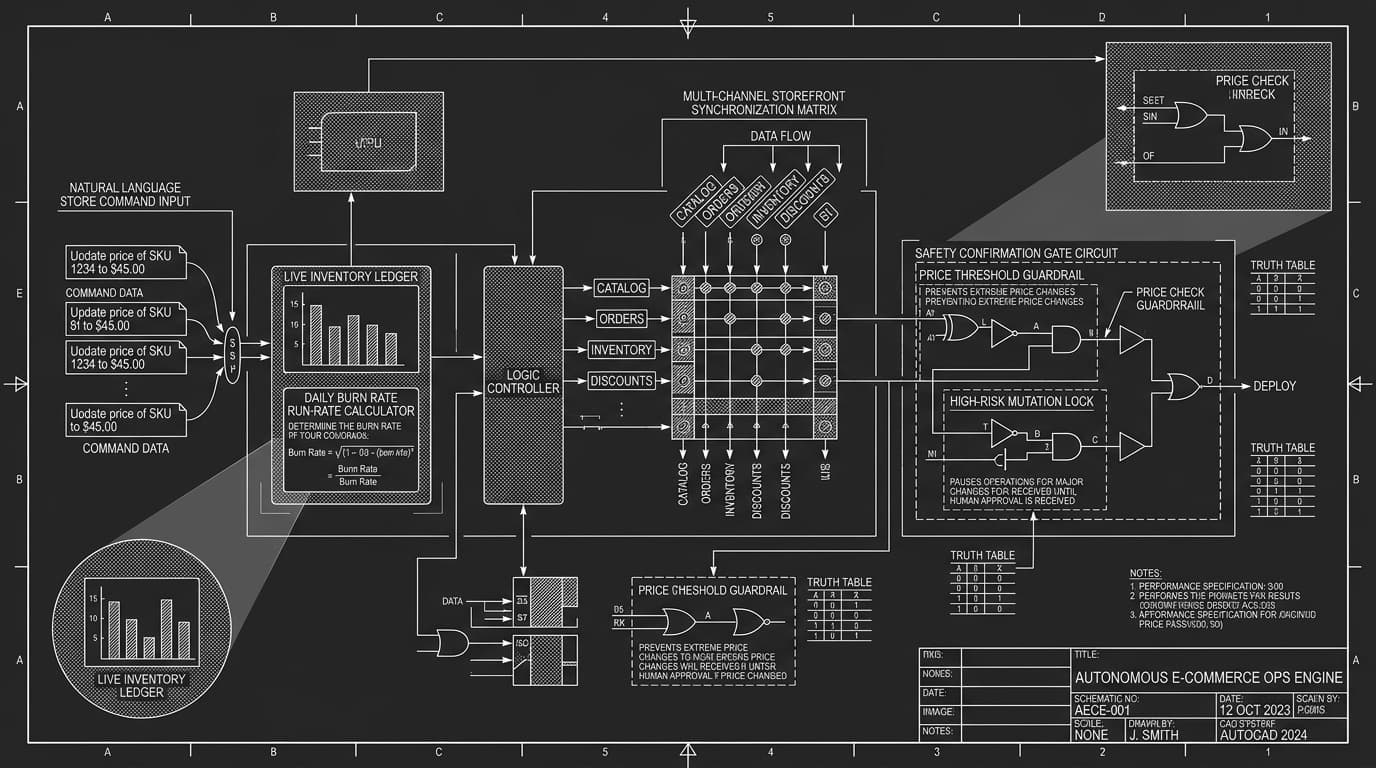
1. The Reality of Running a Store Today: The "Cockpit Problem"
Imagine driving a car where the steering wheel is in the front seat, the gas pedal is in the trunk, the speedometer is in the glovebox, and you have to check your rearview mirror on your smartphone.
That is exactly what running an e-commerce store feels like in 2026:
Most store founders started their business because they love making apparel, formulating skincare, roasting specialty coffee, or curating goods.
Instead, they spend 80% of their work week being a data-entry clerk:
- ›You notice a popular product is sold out.
- ›You open Shopify Admin to check how many units sold this week.
- ›You open Google Sheets to paste the numbers and calculate reorder quantities before stockouts happen.
- ›You open email to send your supplier the exact SKU quantities.
- ›You open Klaviyo to segment customers who purchased that item to schedule a back-in-stock announcement.
- ›You open Stripe or your banking portal to confirm cash flow covers wholesale deposits.
By the time you finish, the day is gone, your cognitive energy is drained, and you haven’t filmed a single creative video, launched an ad, or connected directly with a customer.
2. What Does "Conversational E-Commerce" Actually Mean?
The core mental model is simple: you interact with your store the same way you would speak to an experienced operations manager sitting right next to you.
You don’t click through six sub-menus. You don’t export .csv files. You don’t write complex spreadsheet formulas. You state the desired outcome in plain English, and the workspace handles the underlying execution safely.
How everyday operations change when moving from manual clicking to conversational intelligence
| Everyday Task | The Old Way (Manual Cockpit) | The Conversational Way (Orbit) | Time Spent |
|---|---|---|---|
| Checking Low Stock | Export inventory CSV → sort by stock column → find items under 10 → calculate sales velocity manually | "Which products have less than 10 units left but sold more than 5 units this week?" | 25 mins ➔ 5 secs |
| Adding a New Product Drop | Create product → write title → write description → upload photo → fill tags → set price → add to collection | "Add this linen shirt at $78, 50 units in stock, tag it Summer Essentials, and generate a 3-bullet benefits description." | 20 mins ➔ 20 secs |
| Running a Weekend Flash Sale | Navigate to Discounts → configure coupon code → set minimum cart spend → test discount in checkout → set expiration | "Create code FLASH20 for 20% off orders over $60, expiring Sunday at midnight." | 15 mins ➔ 10 secs |
| Diagnosing a Sudden Dip in Sales | Compare Shopify reports to Google Analytics → filter returns → check ad spend → guess the reason | "Why were sales down 15% this week compared to last week?" (AI detects top-selling SKU went out of stock) | 2 hours ➔ Instant |
3. Step-by-Step: 4 Real Store Scenarios Broken Down
Scenario 1: The "Never Run Out of Stock" Run-Rate Audit
The Problem: Running out of inventory breaks momentum. If an advertising campaign is converting well and inventory hits zero, algorithmic tracking resets, conversion rate collapses, and revenue is lost. Yet calculating reorders manually is tedious because every SKU moves at a different velocity.
How You Do It in Orbit: You enter one prompt into your workspace:
What the AI executes behind the scenes:
- ›Queries the live order ledger to calculate unit purchases over the last 30 days.
- ›Divides by 30 to determine the exact Daily Burn Rate for each SKU.
- ›Cross-references available stock in your live inventory database.
- ›Computes days remaining: (Current Units ÷ Daily Burn Rate).
- ›Formats an interactive status table flagging red-zone items with recommended purchase order quantities.
Scenario 2: Adding Products from Photos Without Form-Filling
The Problem: Uploading a catalog drop takes hours of manual data entry—opening images, writing product descriptions, assigning SKUs, setting prices, configuring tags, and linking collections.
How You Do It in Orbit: Drag the sample photo directly into the prompt bar:
What happens under the hood:
- ›Vision Pipeline: Analyzes the garment silhouette, verifies colors and cut, and isolates product framing.
- ›Brand Copywriter: Drafts clear, benefit-oriented product copy matched to your store tone.
- ›Atomic Database Write: Registers the parent SKU, creates size/color variant rows with exact inventory counts, and syncs to your live storefront.
Scenario 3: Launching Margin-Safe Flash Sales
The Problem: Launching promotions without margin modeling often results in unit losses once payment processing fees (2.9% + $0.30), packaging, and shipping costs are factored in.
What happens under the hood:
- ›Registers the rule in checkout logic with a strict $70.00 minimum subtotal threshold.
- ›Generates code FALLVIP with single-use customer restrictions.
- ›Validates stacking rules to prevent unintended double-discounting on clearance inventory.
Scenario 4: The Revenue Drop Detective
The Problem: Standard e-commerce dashboards reveal when gross revenue declines, but never diagnose why. Store operators are left guessing whether traffic dropped, ads stalled, or the checkout broke.
The intelligence engine cross-references three real-time streams:
- ›Traffic Volume: Confirms visitor sessions remained stable (1,200 unique visits each day).
- ›Checkout Intent: Confirms add-to-cart velocity was consistent throughout morning hours.
- ›Catalog Stock State: Discovers your primary revenue-driving SKU sold out at 2:15 PM Tuesday, triggering instant cart abandonment when customers could not pick their size.
4. Safety Guardrails: How Confirmation Gates Protect Live Stores
The most frequent concern store owners voice is operational safety: preventing unintended price drops, accidental catalog deletions, or runaway inventory mutations.
Orbit implements strict Confirmation Gates that separate read-only analysis from destructive database mutations:
Clear boundaries between autonomous execution and human-in-the-loop authorization
| Action Type | Example Request | Safety Rule | How Orbit Handles It |
|---|---|---|---|
| Safe Operations | "Check orders from this weekend" | Read-only analytics query | Executes instantly without interruption |
| Standard Updates | "Update stock of Black Beanie to 45 units" | Standard parameter adjustment | Executes immediately with structured audit receipt in chat |
| High-Risk Price Drops | "Set price of Luxury Trench Coat to $5" | Risk mutation (>50% margin deviation) | PAUSES: Requires explicit one-click operator confirmation before committing |
| Destructive Operations | "Delete the Winter Collection and archive all 40 SKUs" | High-impact catalog deletion | PAUSES: Details blast radius and mandates explicit confirmation signature before touching database |
5. The Big Picture: Leveling the Operational Playing Field
Enterprise retail conglomerates maintain dedicated teams of data analysts, inventory planners, and logistics coordinators to optimize every barcode.
Independent brands and solo founders typically operate with a laptop, a coffee, and a dozen open browser tabs. Conversational e-commerce levels the playing field—giving lean teams the operational velocity of an enterprise supply-chain department without the overhead.
You don’t need to write SQL queries. You don’t need complex spreadsheet formulas. You don’t need ten disparate SaaS plugins billing you every month.
You focus on product design, brand identity, and customer relationships—and let the conversational engine manage the operational mechanics.
[ CROSS-REFERENCES · E-COMMERCE & ARCHITECTURE RESOURCES ]
Frequently Asked Questions
- [Q]Does conversational e-commerce replace Shopify or WooCommerce?
- No. Orbit connects directly to your existing store infrastructure via secure API keys. Your catalog, checkout, payment processing, and customer database remain fully intact—Orbit provides the autonomous operational intelligence layer that manages them.
- [Q]Can the AI make accidental updates without my permission?
- No. Orbit employs deterministic Confirmation Gates. Read queries and standard updates run automatically, while high-risk mutations (bulk deletions, steep price cuts, or global inventory resets) pause and require your explicit one-click approval before writing to the database.
- [Q]How does Orbit calculate reorder points and inventory velocity?
- Orbit queries your store order ledger over rolling 30, 60, or 90-day windows to determine your exact daily sales velocity per SKU. It divides available stock by daily burn rate to project the precise number of days before a stockout occurs.
Build with Orbit AI Developer Workspace
Connect live databases, generate native Expo mobile codebases, and eliminate fragmented subscriptions inside one continuous environment.